
- If you have “Ignore” button under the error text, try to press it. It should work in the most cases.
- Disable (or remove) all mods. You can do that by renaming mods folder or deleting it.
Shader Error#
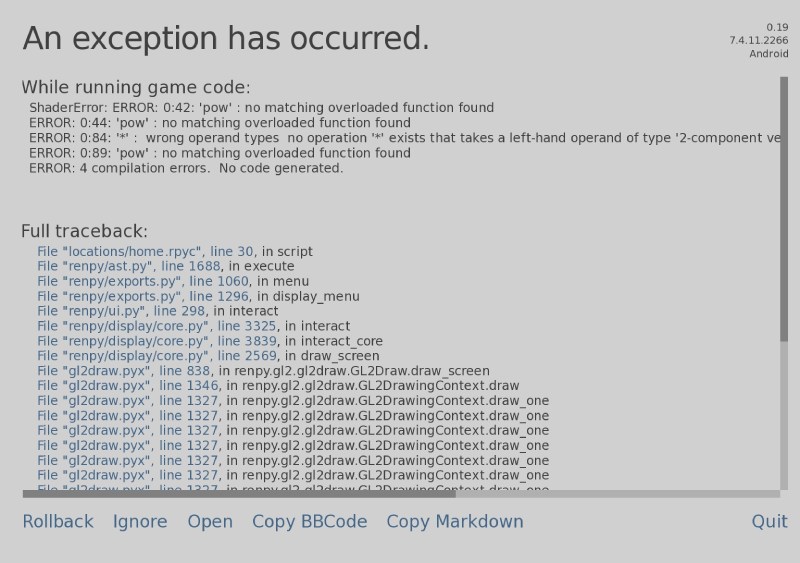
To fix this error open Settings - Graphics and pull Interactive objects highlighting all the way to the left.
Save Error#
I'm sorry, but an uncaught exception occurred.
While running game code:
File "game/core/screens/gui/main_menu/main_menu.rpy", line 29, in execute
File "game/core/screens/gui/main_menu/main_menu.rpy", line 29, in execute
File "game/core/screens/gui/main_menu/main_menu.rpy", line 38, in execute
File "game/core/screens/gui/main_menu/main_menu.rpy", line 46, in execute
File "game/core/screens/gui/game_menu/load_screen.rpy", line 1, in execute
File "game/core/screens/gui/game_menu/load_screen.rpy", line 1, in execute
File "game/core/screens/gui/game_menu/load_screen.rpy", line 2, in execute
File "game/core/screens/gui/file_slots.rpy", line 1, in execute
File "game/core/screens/gui/file_slots.rpy", line 1, in execute
File "game/core/screens/gui/file_slots.rpy", line 4, in execute
File "game/core/screens/gui/file_slots.rpy", line 20, in execute
File "game/core/screens/gui/file_slots.rpy", line 28, in execute
File "game/core/screens/gui/file_slots.rpy", line 33, in execute
File "game/core/screens/gui/file_slots.rpy", line 34, in execute
File "game/core/screens/gui/file_slots.rpy", line 34, in <module>
TypeError: sequence item 9: expected str instance, NoneType found
-- Full Traceback ------------------------------------------------------------
Full traceback:
File "renpy/common/_layout/screen_main_menu.rpym", line 28, in script
...
File "game/core/screens/gui/file_slots.rpy", line 34, in <module>
File "game/core/services/save-warnings/SaveWarningsChecker_ren.py", line 17, in check_slot
File "game/core/services/save-warnings/SaveWarningsChecker_ren.py", line 36, in is_mods_mismatch
TypeError: sequence item 9: expected str instance, NoneType found
How to fix this error:
- Start the game (Start from new content - Skip intro)
- Open Cheats menu (wardrobe in the left corner at home)
- Open Console
- Enter
persistent._clear()and press Enter - Enter
exitto close console
The issue should be fixed.
This article is updating